在808DA数控系统上不断电升级image
2020-08-26陈刚羌铃铃
陈刚 羌铃铃

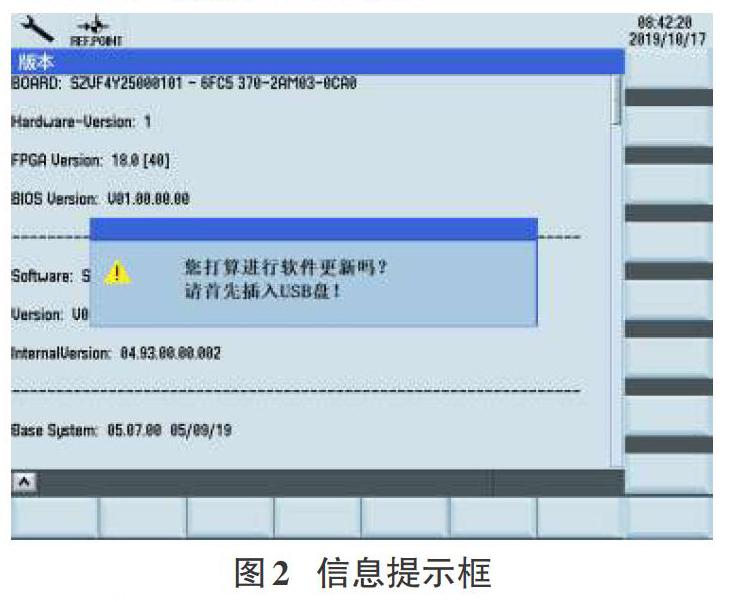
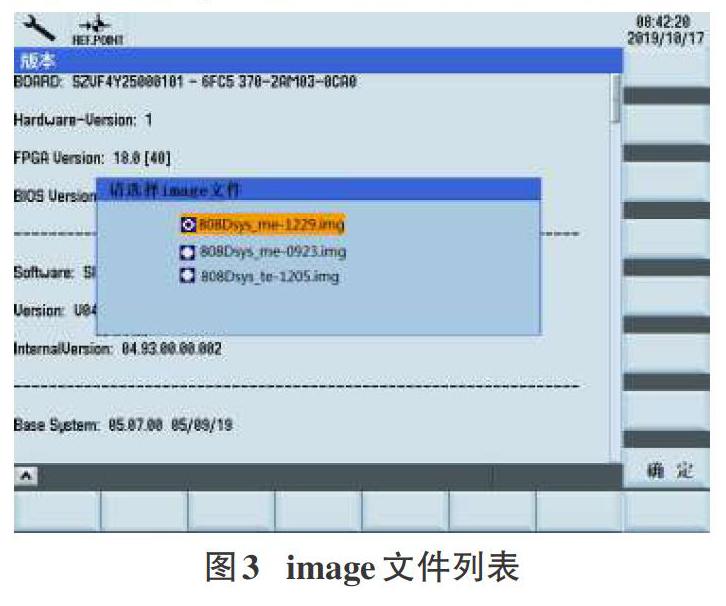
摘要:西门子数控系统SINUMERIK 808D Advanced产品在市场得到了广泛的应用。针对每次更新升级image时都需要对数控系统断电从而导致用户操作不方便的现象,提出了一种新的不断电的升级方式。详细地讨论了新的升级方式的操作步骤。在带电的情况下插入USB盘,读取其中的image文件并将其解压、mount到Linux操作系统中。与以往的升级方式比较,新的升级方式能够保持带电状态下更新、激活image文件,同时在文件解压操作上也有了新的改进。采用新的升级方式,不再需要两次断电,给用户操作808DA数控系统带来很大的便利。
关键词:808DA;image文件;断电升级;mount技术;带电升级;HMI
中图分类号:TP311 文献标识码:A
文章编号:1009-3044(2020)20-0204-03
Upgrade Image of Uninterrupted Power Supply on 808DA Numeric Control System
CHEN Gang1, QIANG Ling-ling2
(1.Nan Jing MoDi Multiple Dimensional Digital Limited Company, Nanjing 210034, China; 2.Jiangsu Province SuCe informationtechnology Co.,LTD.,Nanjing 210013. China)
Abstract: Siemens "SINUMERIK 808D Advanced" Numeric Control system product has got widely used in market. Due to the phe-nomenon that updating image every time to power off Numeric Control system leads to some inconvenience for user's operation, theauthor provides one novel means of upgrade image with uninterrupted power supply. The operation steps of the new upgrade are dis-cussed in detail. Please insert the USB stick when 808DA controller is in power. The Numeric Control system will read the imagefile which is designated by user and unpack it, then mount it into linux operation system. Compared with other old upgrade means,the new upgrade method can let 808DA image file be updated and be activated in power. In addition. there are some newly improve-ment for uncompressing image file. Using the newly upgrade means, customer needn't power off two times any more. These modifi-cations will bring great convenience for customer to operate 808DA Numeric Control system.
Key words: 808DA; image file; upgrade; with power off; mount technique; upgrade in power; HMI
1引言
伴隨着现代化机械T业的快速发展,西门子SINUMERIK808D AdvanCed数控系统[1](简称808DA NC)有很广泛地应用。客户可以使用它来生产汽车或飞机上零部件。为了满足客户的需求,我们为SINUMERIK 808D AdvanCed数控系统开发了一些新功能。而且有时客户也会反馈一些PR缺陷问题,我们需要为客户解决这些问题。
如果我们为系统集成了新功能或者解决了软件的一些bug,我们需要升级更新的image文件进入808DA NC数控系统。但是目前使用的更新image方法需要多次断电,这样很烦琐和不方便。
2目前系统升级是怎么实现的?
目前为止,如果我们想更新image到808DA NC数控机床[2,5],我们使用的是下列的操作步骤。
1)首先,我们插入USB盘进入808DA NC数控机床[6]的PPU操作面板上。然后我们按下断电按钮让系统断电,再按一下这个按钮让系统上电。
2)第二步,我们将重新上电808DA NC系统,让NC系统重启。……